12.11.25 Checklist Authors can add Dispatch Launch Procedures directly to Numeric Tasks
Document Center - Checklists
We’ve relocated reject limit settings directly into each Numeric Input task.
This means each task can independently trigger its own dispatch—no more duplicating entire checklists just to manage different limits.
What This Means for You
- Create and update checklists faster
- Reduce complexity and the risk of configuration errors
- Keep all limit-related controls neatly grouped with the relevant task
- Enjoy cleaner, more maintainable checklists overall
12.11.25 What's App Notifications & UX Changes to Analysis Lenses
Notifications
You can now have notifications delivered to your What's App account! Learn more about set up here: https://support.leading2lean.com/hc/en-us/articles/41658645032333-What-s-App-Notifications
Analysis Lenses
- New Insights Button: A central button that opens a Quick Pick Dropdown, allowing users to instantly select a Lens or access Advanced Mode.
- Side Chat Panel: We have moved the delivery of insights directly into a side chat panel.
- Streaming Responses: Users will now see a streaming response, meaning you can read the analysis in real-time as it is returned back to you.
- Advanced Mode: Users can still access Advanced Mode if they want to create custom lenses.
12.10.25 Mass Close Open Checklists
Document Center
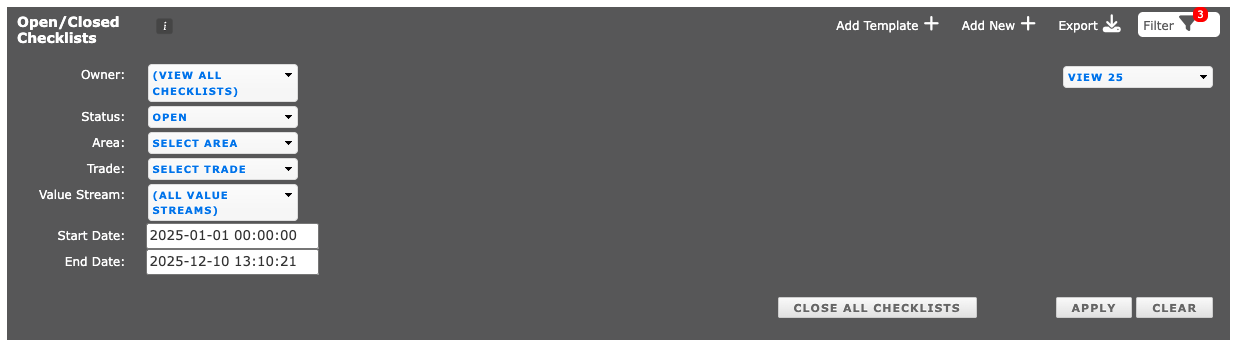
Tired of individually closing unneeded opened checklists? or maybe just seeing a long list of open checklists and avoiding them?
Document Admins can now close all checklists in their filtered view of Open/Closed checklists.
12.2.25 PM Effectiveness Analysis Lens for the Dispatch History Report
AI
We're excited to announce the release of our new AI capability: the "PM Effectiveness Analysis" Lens! This feature is integrated directly into the Dispatch History Page. This new capability is a powerful tool focused on providing Maintenance Managers with critical data insights to quickly assess their Preventative Maintenance program.
To learn more about where to find it and what it can do, check out this article: https://support.leading2lean.com/hc/en-us/articles/41565205198477-PM-Effectiveness-Analysis-Lens
11.24.25 Dispatch Machine/Sub Asset Change & Add Users API Update
Dispatch
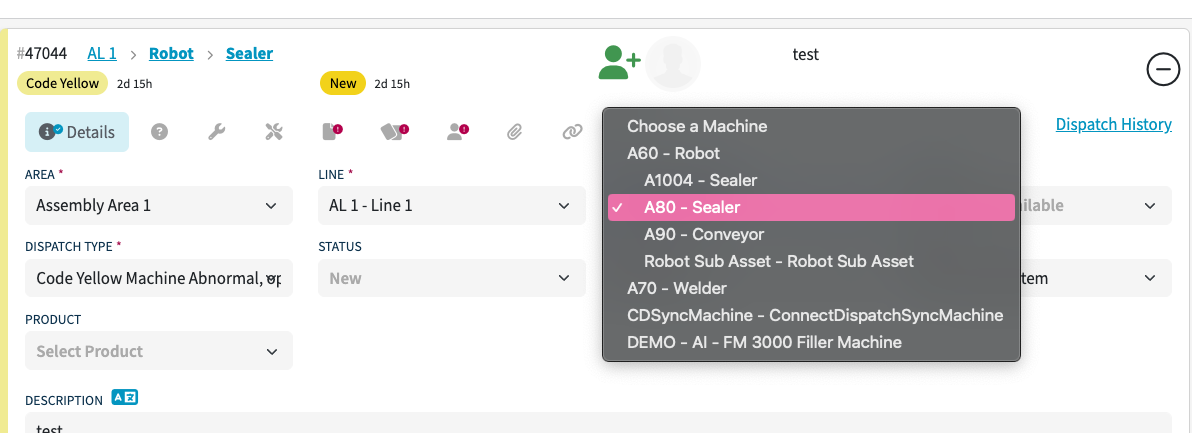
We’ve improved the dispatch dropdown to make sub-assets easier to recognize. Sub-assets now appear indented beneath their associated machine, so your selection is always clear.
API
Add Users API now has the SSO field as an option
11.19.25 Checklist Auto-Save
Document Center
- Checklist Auto-Save is here! This update ensures your progress is always captured — even if you navigate away or lose connection.
- Corrective Actions/Notes has been renamed to Comments/Notes.
- We've also added more specific error messages when checklists can't be closed.
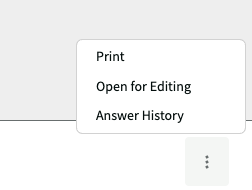
- Closed Checklists - The Open Checklist for Editing button is now in the three dots on the bottom right, along with the option to Print & the Answer History.
Reports
Checklist Answers has been renamed to Checklist History
11.17.25 Machine Dashboard Update
Dashboards
The Machine Dashboard now shows the Serial Number of the Machine. The Serial Number can be added in the Machine Setup page.

11.14.25 User Clock In API Changes & New Usertime Update API
API - User Clock in by External ID
We were seeing some check in issues caused by automated API check-in/check-out calls happening at the same time as the check-in process in the UI. This conflict could occur when operators acknowledged skills.
To resolve this, we’ve separated skill acknowledgment from the full check-in process. Now, when an operator needs to acknowledge a skill, they’ll simply enter their username and password—without being forced to check in again if they’re already checked into the line.
This update removes the timing conflicts between UI and API check-ins and should provide a smoother, more reliable experience for your operators.
API - usertime/update/id
We've added a new API that allows you to modify existing usertime entries directly. You'll find it in our API documentation.
11.14.25 OA Impact Analysis Lens
- An instant understanding of the key events and factors impacting Overall Availability (OA) for a specific production line
- A diagnostic summary of the most significant impacts
- Actionable insights to accelerate problem identification and decision making
Learn more about it here: https://support.leading2lean.com/hc/en-us/articles/41021308342797-OA-Impact-Analysis-Lens
11.13.25 More Checklist Improvements
Documents
Checklists will now retain the color indicator for numeric inputs so end users can see them in completed/closed checklists.

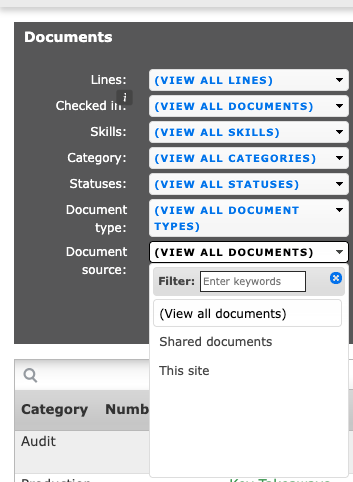
You can now filter Shared Documents from Local Documents
11.11.25 Checklist UI Updates based on Customer Feedback
Documents
We heard your feedback! When we removed the print button in the last Checklist UI update, we discovered that many of you rely on it more than expected — so it’s back!
You can now print your checklist by clicking the three dots at the bottom right of the checklist template page.

11.5.25 Checklist Document Detail UI Changes
Documents
We've streamlined the process for Document Admins to be able to edit a checklist template by reducing the amount of additional clicks. The Edit Checklist Template button will now directly navigate you to the Edit page, instead of requiring you to click Edit again.
The print button has been moved to the bottom right corner of the 'Fill out checklist' page.
Bug Fix
Occurrence Pareto - When a why code is selected, the Machine Detail page will show the accurate dispatches representing that why code
11.3.25 Machine Analysis Lens (AI!)
- Instantly unlocks the value of Dispatch data to aid Maintenance Managers to quickly make decisions about how to improve their machine performance and reduce downtime
The "Machine Analysis" Lens is integrated directly into the Machine History page. With just a click, instantly analyzes detailed Dispatch data to give Maintenance Managers:
- Instant visibility into their most impactful machine issues.
- Clarity on how well their fixes are working.
- Recommendations for the next best action.
No more digging through Dispatch data! This new AI capability eliminates manual analysis work by automatically diagnosing machine failures and evaluating fix effectiveness.
- It drastically reduces analysis time and accelerates decision making
- It provides immediate, context-aware insights about machine impact and action effectiveness, all on a single, easy-to-read page
- It helps to quickly identify machine failures, assess fix reliability, check PM effectiveness, and pinpoint root causes of common failure modes
This capability uses Natural Language Processing (NLP) and detailed Dispatch History data to generate a tailored analysis. Our "Lens" is a predefined prompt that queries Dispatch data to give specific, actionable insights needed to improve operational availability. Next Steps
- Customer can start using the "Machine Analysis" Lens on any Machine History page in Dispatch today!
- We'll be monitoring adoption and gathering feedback immediately to guide the future of this exciting capability
- More releases with tailored Lenses to address specific use cases to come
https://support.leading2lean.com/hc/en-us/articles/40838230137997-Machine-Analysis-Lens
10.30.25 Checklist Template UI Changes
Documents
We've updated the buttons on this page so that:
Users are able to Edit a Checklist Template as directly as possible by reducing the amount of additional clicks and navigation and to prevent users from getting lost to key a action to complete a checklist
-
It's clear what the primary vs secondary vs tertiary actions are for the author/admins

10.27.25 Product Order Filter
Production
Fix: The Product Order filter will filter by the line assigned only
10.24.25 Checklist Template UI Update
Documents
The Checklist template UI has been modernized.
10.22.25 New Scheduled Report Options
Reports
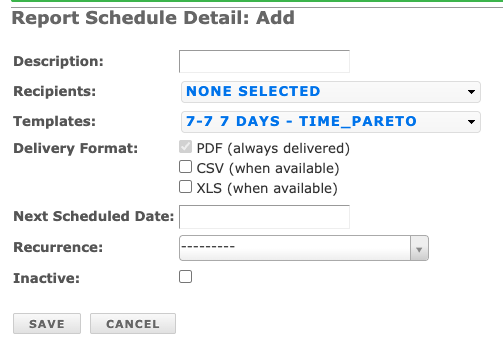
Scheduled Reports can now be delivered as XLS or CSV in addition to PDFs.
10.21.25 Dispatch by Trade now available for all Dispatches
Setup
A few weeks ago, we introduced dispatch by trade for the Quick Fix button. Now, you can enable it for use anywhere a dispatch is created. https://support.leading2lean.com/hc/en-us/articles/227168508--Setup-Dispatch-Types
Here are a few reasons you'll want to set it up today!
- default allows for improved data accuracy,
- save time managing the dispatch & dispatching to the correct person,
- reduce decision fatigue,
10.21.25 Target now included on Daily & Weekly Production Reports
Reports
Target has been added to the Daily & Weekly Production Summary Reports and exports.
10.14.25 Bug Fixes
Spares
The Created by Timestamp in the Spares Queue is now using Local Time (was using UTC).
Checklists
Users can now have special characters, such as &, in their passwords when using their username and password to save a Checklist.
10.8.25 Checklist UI Enhancements
Document Center
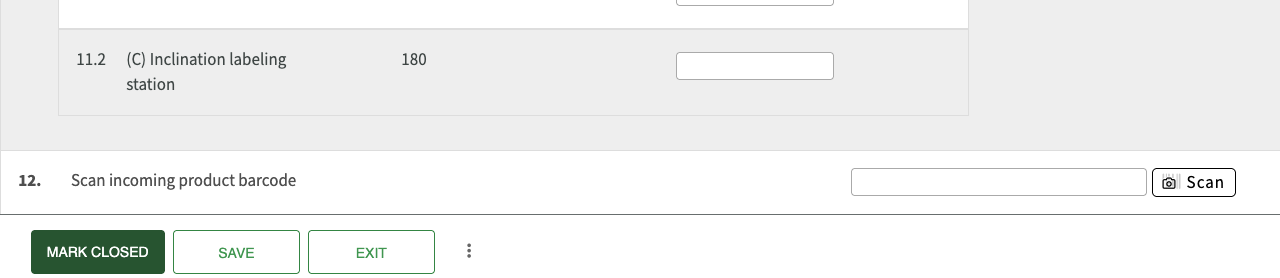
- We now support tabbing when filling out a checklist! This means using the tab button on your keyboard will now navigate you through each field of the checklist to fill out.
- You'll also notice the UI is cleaner and buttons have been relocated when filling out a checklist.
10.1.25 Dispatches API Update
API
The /api/1.0/dispatches/data_export/ api now supports filtering by started_since. See the api documentation for more details.
9.30.25 New! Serialized Spare Part Warranties
Spares
New! You can now track the warranty status of serialized spare parts directly within L2L, helping you reduce unnecessary purchases and lower operating costs.
Learn how to set this feature up here.
Update - Serialized Parts locations will now be filtered to the locations associated with the part in inventory control.
9.25.25 OEE Drill Down Update & Request Spare UI Update
Spares
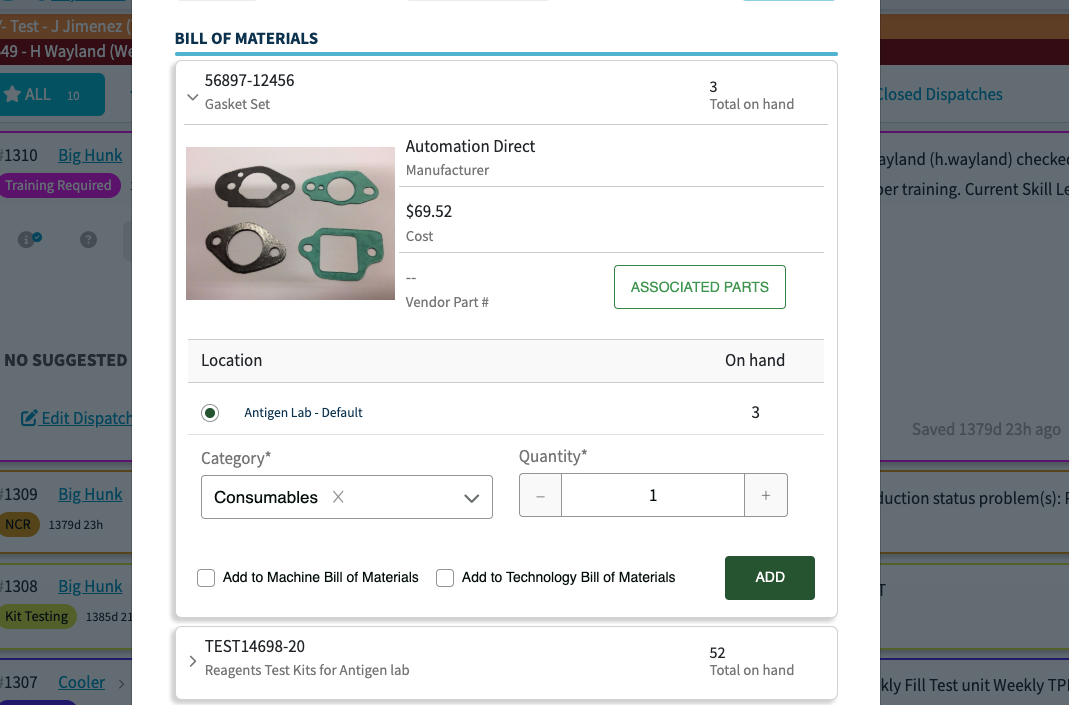
Requesting a spare from the Tech Portal has a new look!
Dashboards
OEE Drill Down now allows you to drill down all the way to the line level, by opening the Operator Portal.
9.24.25 Trades by Dispatch Types for Quick Dispatch
Setup
In the setup for Dispatch Types, you'll now see a dropdown for 'Trades'. This functionality will allow you to set a default trade per Dispatch Type. Please note that this feature is currently only available for the Quick Dispatch option on Operator Console or on the Role Based Homepage. We'll be adding it to the New Dispatch button in the coming weeks!
9.10.25 Role Based Homepage Update
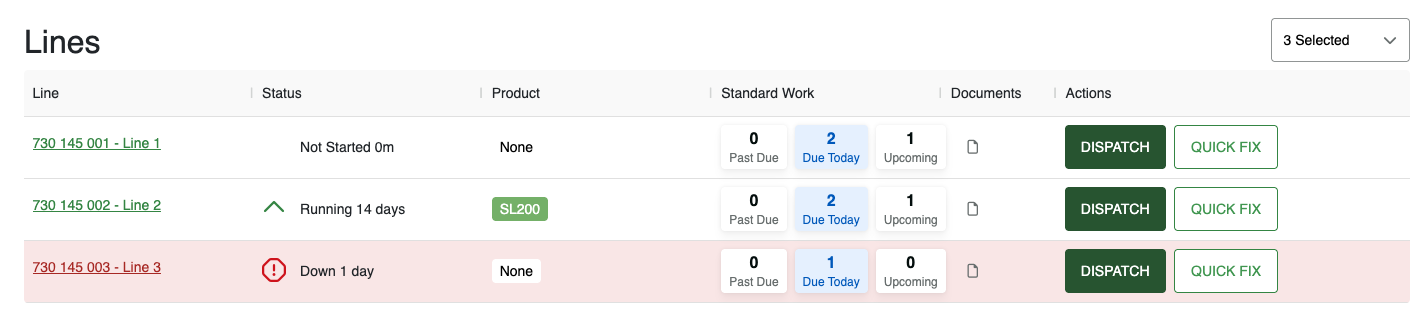
Role Based Homepage now has a Quick Fix option!
8.26.25 Operator Console Comments Now Visible on Op Portal
Production
When an operator adds a comment on the Operator Console, that comment will now be visible on the Operator Portal in the pitch that it was submitted for.
Operator Console comments will now also be included on the Product Order & Build Sequence.
8.25.25 Browser Notifications are HERE
Notifications
We've just released Browser Push Notifications as a more reliable alternative to SMS. We strongly recommend enabling them today to ensure you receive all critical Dispatch alerts. You can also view a complete history of your alerts in the new Notification Center - just look for the bell in your L2L menu navigation!
https://support.leading2lean.com/hc/en-us/articles/38471365364365-Browser-Notifications
8.18.25 Line Cycle Time Page Updates & Scheduled Reports Update
Production
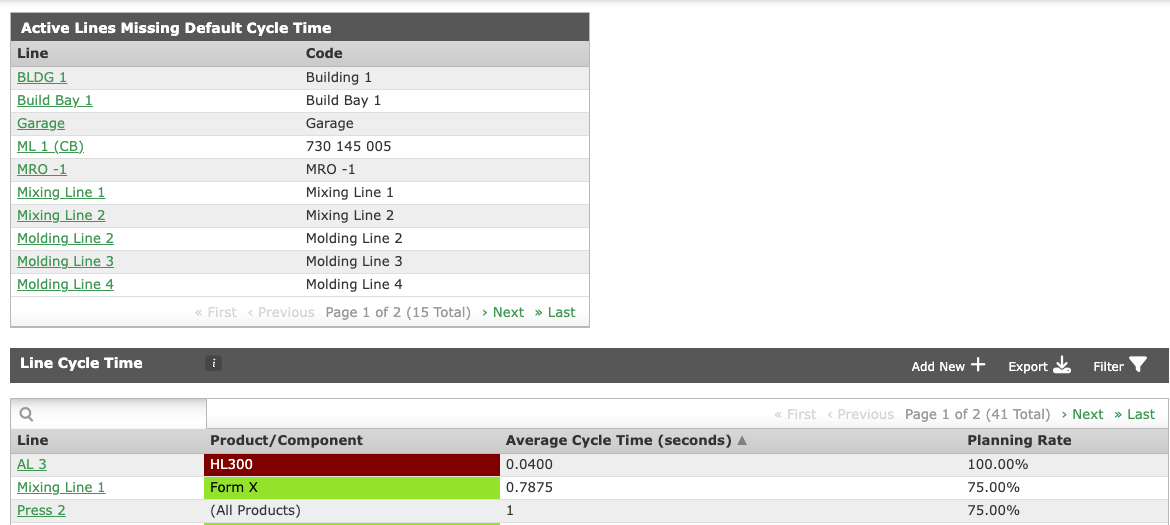
- Users can now sort by Average Cycle Time on the Line Cycle Time page
- A new table has been added to the Line Cycle Time page that shows users Lines without Default Cycle Times set for all products
Reports
Scheduled Reports hyperlinks will take the user to the live version of the report, not the printable PDF version. The printable PDF will still be attached to the email.
7.31.25 Walkie Talkie Icon on Operator Console
Production
The bell icon on the Operator Console has been changed to a walkie talkie icon.
7.23.25 Retroactively Add Scrap Time
Production
A new setting will allow certain roles the ability to add or change scrap detail records retroactively. Please see more here: https://support.leading2lean.com/hc/en-us/articles/38275769769357-Collect-Scrap-Details-Retroactively
7.14.25 Pitch Grouping on the Operator Portal
Production
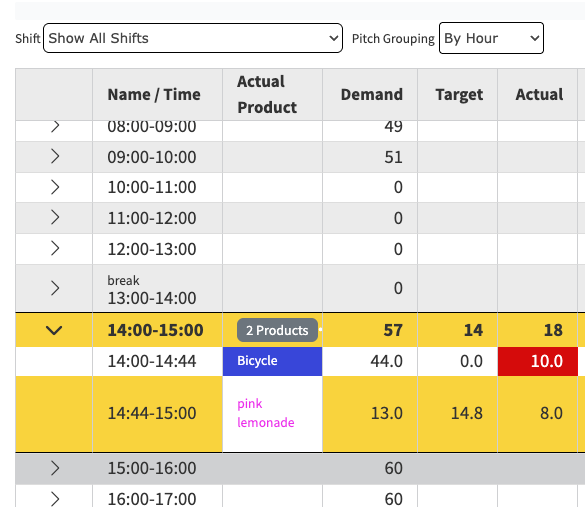
We've added a new option for grouping pitches on the Operator Portal. You can group by Hour or Schedule or leave it as is (Default)
7.10.25 Updates to the Role Based Homepage - Standard Work
Home
The Role Based Homepage now has a clickable Standard Work Widget.
Clicking into the Standard Work, pulls up a new window where you can see Past Due, Due Today, or Upcoming Standard Work, along with the Last Completed, Next Launch and Next Due Dates. You can also Start the Standard Work from there!

7.9.25 Introducing Operator Scorecard
Dashboards
This new dashboard is designed to empower supervisors and plant managers with critical insights into operator performance.
Quickly monitor key production metrics like Utilization, Uptime, and Quality to identify improvement areas and make data-driven decisions that optimize output.
If you’d like to enable this feature, our Customer Success team can help. Learn more here: https://support.leading2lean.com/hc/en-us/articles/37169066161933-Operator-Scorecard
6.24.25 New Field on the Scrap Details API
API
The Scrap Details API endpoint now has a field called Scrap Events. This field will allow you to see a more granular timestamp for each scrap received.
6.13.25 New data export api's for Dispatch, DispatchTechnician, and Pitch records added
New data export api's for Dispatch, DispatchTechnician, and Pitch records have been added. See the API documentation for the /api/1.0/dispatches/data_export/, /api/1.0/dispatchtechnicians/data_export/, and /api/1.0/pitches/data_export/ endpoints. These can be used to efficiently get exports of data and should be used instead of the paged filter api's to get large amounts of data. Also, the /api/1.0/dispatchtechnicians/ api is being changed to require explicit filtering by a site. This restriction is not live yet, but will be turned on at the end of June 2025.
6.13.25 Standard Work Date Time Changes
If standard work hasn’t been completed ever or in the last 90 days, the operator portal will now note "Not Within Past 90 Days" instead of the date it was last performed. Any standard work done in the last 90 days will show the date and time as usual.
6.10.25 AI Checklist Transcription Tool
Checklist Bulk Upload AI Tool
We've just launched an exciting new feature! Bulk Upload of Documents to create Checklists!
- Upload multiple documents at once for automated conversion into L2L digital checklists, drastically reducing manual data entry time and improving knowledge sharing.
- Learn more here!
6.9.25 Skills character limit increase & documents modify api logic change
API
Update to document/modify API:
When a document/modify API call is made, the system will not update the attach_method if it is not included in the payload. The document/modify method will update the attach_method if it is explicitly included in the payload.
Skills
Skill Code character limit has been extended from 50 to 75.
5.15.25 Bug Fixes
Production
Updating the Operator Count on a Build Sequence now updates the planned cycle time of the build sequence. For example, the system defaults the planned operator count to 1 and sets the cycle time for that default of 1 upon creation. Now, when you go back into the build sequence to edit the planned operator count to say 2, it will update the planned cycle time that correlates to 2 operators for that product.
Reports
We've fixed a long standing bug where the Scrap count was off between the Operator Portal and Scrap Report.
Skills
Set Using Skills Trainers via the API now works as expected
4.28.25 Role Based Home Page for Supervisors is Here
Role Based Home Page
Supervisors! Get instant access to critical line status and Dispatch information, enabling faster decision-making and improved productivity right when you log in.
Check out our article on set up here.
4.18.25 Quick Dispatch Layout Color Change in the Operator Console
The Quick Dispatch options in the Operator Console have been changed from Blue to Green.
4.18.25 L2L/ Swipeguide Instructions
The first step in integrating L2L & Swipeguide is complete! Subscribers to L2L AND Swipeguide can reap the benefits TODAY!
Swipeguide Instructions can now be used within L2L; in Dispatch and Production.
- Learn more about how here. Video included!
- If you'd like to set up a demo to learn more, you can do that here.
3.31.25 Editing Checklist Images
Document Center
Prior to this enhancement, in order to update the description you would have to remove and re-upload an image. We've streamlined this process by enabling direct editing of picture descriptions to improve efficiency, reduce project timelines, and free up resources for other critical tasks.
3.25.25 New Production Setting for Planned Operator Count
Production
Use Planned Operator Count for Scheduling: This will take into account the planned operators to set demand on the pitch when using the ekanban planning tools instead of the build sequence planned operator count.
3.18.25 Machine Setup Filters & Scheduler Character Limit Increase + Bug Fixes
Setup
The Machine Setup page now has filters for Areas and Lines.
Scheduler
We've increased the character limit of the comments box on the event scheduler.
Bug Fixes
Dispatch Portal: Users can now view attachments in the Dispatch/ Technician Portal.
Checklists: Text Task Types that are Links will no longer require an NA in order to close the checklist when 'require answers to all questions before closing checklist' is enabled.
New Checklists created when launching from the 'Linked Documents' section of the Tech Portal are now added above the Linked Documents, so the user can easily get back to the Checklist they started without inadvertently starting a new one.
3.12.25 Duplicate Schedules Bug Fix
Scheduler
We've released a fix so that you cannot have duplicate schedule event names. With this fix, if you already had duplicate event names, you will receive an error when trying to update a schedule. You'll need to change the event name in order to save. Our recommendation is to go to your Inactive or Empty Machine Schedule Lists and search for the duplicate and change that name, then go back to the schedule you were trying to edit and make the update.
3.5.25 Next & Previous Buttons Across Pages & New Sort Option on Portal
We've made the header of all the pages where we have an option to go to Next/Previous Page Frozen so that they are always available in order to help the users to go to the Next page or Previous Page. Places where you may see this:
- Documents
- Scheduler
- History Pages
- Spares
- Skills
- Reports
- Setup Screens
Production
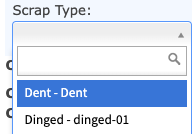
New setting in Production Settings that shows Defect/Scrap Code on Op Portal Scrap/Actual Pitch Details with setting enabled
If no Lines in an Area have Production enabled, the Area/Lines will not be visible in Production.
Dispatch Portal
There is a new Sort Option - Priority, Due Date: This sorts first by priority then by due date, then by the Dispatch ID/Launch Date

2.25.25 Notifications by Reason Codes & Dispatch Setting Update
Notifications
You can now enable Notifications by Reason Codes
Dashboards
We've limited the Dashboards you can see by the Modules you've purchased. For example, the OEE Dashboard is present when you've purchased the Production Module.
Dispatch Setting
L2L Admins can enable a Site Setting to require users to enter in who created the Dispatch.

2.21.25 New Dispatch Button Update & Notifications for Work Orders
Notifications
We've added the ability for the individual who submitted the Work Order to be notified about changes to the Work Order Status.
Dispatch
We've added settings to remove "New Kaizen" & "New Work Order" from the New Dispatch button. You'll find those settings in the respective modules settings page.

2.20.25 Dispatch Portal Enhancement & UX Update to Work Orders
Dispatch Portal
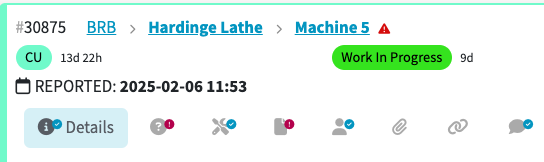
We've added a new View Option - Show Reported Date
Work Orders
There are now red asterisks next to the required fields when adding a new Work Order.
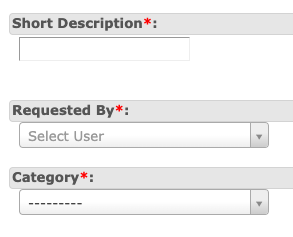
2.17.25 Dispatch Notes Update & Bug Fixes
Dispatch
Notes are now editable!

Bug Fixes
We've fixed several instances of UTC time being displayed instead of local time.
We also pushed out a fix for on the Product Order page that was showing a filter applied when there wasn't.
2.11.25 Microsoft Teams Notifications now have a Button to the Dispatch
Notifications
Many of you have asked and we've delivered! The Microsoft Teams notification will now include a button to get you straight to the Dispatch.
2.6.25 New Dispatch Type Setting & Dispatch Portal Search Update
Setup
Within Dispatch Type Setup, there is a new setting called 'Default Expanded Tab'. Your selection from the dropdown will be what the Dispatch opens to when you are on the Tech Portal.
For example, if I have selected Documents, when I am on the Tech Portal and click to expand the Dispatch, it will automatically open to the Documents Tab as opposed to the Details tab (as is default).
Dispatch Search
We've had some performance issues with the Dispatch Questions search on the Tech Portal and Classic Dispatch page. At this time we've removed the search functionality for this feature but will continue to investigate ways to make the performance better while maintaining this functionality for your use.
2.5.25 Save & Schedule Dispatch Questions and Checklist Questions Reports
Reports
You can now Save & Schedule Dispatch Question & Checklist Question Reports!
1.31.25 Updates to the Machine Status Dashboard
Dashboards
The Machine Status Dashboard has a few new toggles:
If you are using Sub Assets, you can now see those on the display.
You can also toggle on Dispatch Details, which will:
- The Machine Status Dashboard displays the current dispatch status ("Waiting," "Work in Progress," "Running," or custom status) for each machine or line
- The dashboard updates the dispatch status in near real-time (e.g., updates every 30 seconds or less)
- When a dispatch status is "Work in Progress," the name and icon of the assigned resource is displayed
- If available, the image of the assigned resource is displayed alongside their name and icon
1.28.25 Dispatch Setting & New Shift Scheduler Calendar Type
Scheduler
Calendar Type - Shifts: Fixed Interval - This allows the user to set up a schedule using shifts. You can launch the schedule against each shift or choose which shifts. Dispatch will launch at the beginning of each Shift.

Bug Fix
Scheduler Calendar Days of Week Setting now works with the Daily Interval.
Dispatch Setting
You can now display the order you want the Hierarchy listed when creating a Dispatch
- Default is Machine to Area
- Setting enabled changes is to Area to Machine
- Note: SubAsset now falls under the Machine

1.24.25 UI Update to Checklist Revision Page & Planned Downtime Enhancements & User Site Import
Document Center
The create document revision page has a new look!

Dispatch Types - Metric Settings
Track Planned Downtime using Dispatches - This allows the customer to easily log planned downtime events, such as company meetings or trainings, etc. You can choose to Exclude Planned Downtime from the LMPU Production Metric or Exclude Planned Downtime from Availability Production Metric. Planned downtime minutes would then be subtracted from the LMPU and Labor Efficiency formulas OR the OA formula, since planned downtime minutes should not be counted as production minutes.

User Site Import
L2L Support can now import certain user fields associated at the site level such as Roles, Lines, Shift, Trade, Resource Rate, Resource Category. This further enhances the new ability to export site specific user fields.
1.20.25 Bug Fixes & API Method Update
Dispatch
Work Order Attachments now show up in the Tech Portal Attachments section.
Reports
The Occurrence Pareto saved template now includes the Table Type.
API
The Product Order Build Sequence - Sync Order Details API now has two new parameters:
- linecodes_that_can_build (Optional)
- line_externalids_that_can_build (Optional)
1.10.25 Sub Assets are Live!
Setup
To address the challenges faced by customers with complex machinery, we have added a 5th level of hierarchy—Sub Assets
- Customers can now attribute downtime to a Sub Asset
- Customers can filter reports by the Sub Asset
- Customers can drill reports down to the specific Sub Asset
https://support.leading2lean.com/hc/en-us/articles/32490720651021-Setup-Subassets
1.9.25 Skills Requirement Matrix Update
Skills
We've sorted the X Axis to be Alphabetical on the Requirement Matrix, along with freezing the header row.
You can now change the User Skill Retrain Date by API.
1.7.25 User Export
Setup
We've added a Site specific User Export that includes the users along with the site fields for trade, shift, resource rate, etc that are site specific as opposed to global settings.
The traditional global User Export now has a field for if the user has an image present on their profile. This field will show as True/False.
1.6.25 Record Details API Additional Parameter
API
Record Details Method
Users will now be able to pass in the parameter: continue_current_build_sequence = True and this will make it so that they can continue to overbuild on the current build sequence and will not automatically move to the next in queue.