Collect Scrap Details Retroactively
Last updated: June 19, 2026
Summary
In order to properly document when scrap actually happens, scrap needs to be recorded with a timestamp as close as possible to when the scrap event actually occurred. We know sometimes it's hard to juggle all of the responsibilities of a line and make sure timestamps are accurate while you're at it. This setting will allow certain roles the ability to add or change scrap detail records retroactively.
Setup
L2L Support can enable this site setting for you.
Once enabled, Admins with User Admin permissions will need to go into the User Role they wish to grant permission for and enable the 'Defect Datetime' setting.
Note: This feature only works if you are using Scrap Types or Scrap by Machine.
How to
Open a Pitch (Must be current or previous pitch, not a pitch in the future)
Select the Scrap Type, Quantity, and Input the Time
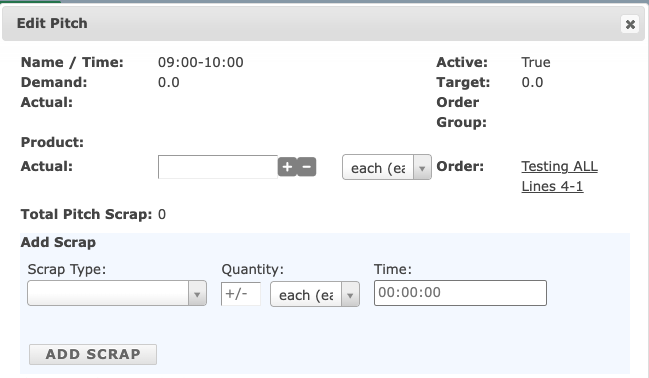
Click Add Scrap.
Notes:
If a valid scrap time is entered: The specific scrap time is saved in the scrap_events for the /scrapdetail/ endpoint
-
If no scrap time is entered:
during a current pitch: The current time is saved in the scrap_events for the /scrapdetail/ endpoint
during a previous pitch: The start time of the selected pitch is saved in the scrap_events for the /scrapdetail/ endpoint