📕 Production: Line Cycle Times
Last updated: September 21, 2026
Line Cycle Times
Once Products have been added to a site, Line Cycle Times can be defined. A Line Cycle Time is the number of seconds needed to produce one unit of a specific Product on a specific Line. This value is used to calculate Demand on pitch boards. It is also used to display the estimated total order time in the Order and eKanban Planning screens. If a Line uses the same cycle time for multiple products, you can set a default Line Cycle Time for all products on that Line by leaving the Product dropdown empty in the Line Cycle Time details screen. Under Production settings, you can choose where the cycle time on your saved pitches comes from: either Line Cycle Time Settings First or Build Sequence First. When a build sequence is involved, the pitch Ideal Cycle Time is selected according to the Production setting Cycle Time lookup order when saving a pitch. Note: this defaults to Line Cycle Time Settings First.

In L2L, a pitch is a scheduled block of production time on a Line. Pitch boards, Pitch Actuals, and pitch span all refer to planning or recording activity within those time blocks.
How to Set Up Line Cycle Times
Go to Production and open the Line Cycle Time area.
Add a new entry or edit an existing entry for the Line and Product.
Enter the cycle time details. To create a default Line Cycle Time for all products on a Line, leave the Product field blank.
Save the record.
Planning Rate
The Planning Rate is used to accommodate known productivity losses by dividing the Cycle Time by the Planning Rate to come up with a more 'realistic' Cycle Time to be used for setting Demand and determining total order production time.
Example: If the Cycle time for a product is set to 60 seconds to make a single part but consistent downtime issues prevent parts from being made every 60 seconds, applying a Planning Rate of 75% will mean a Cycle Time of 80 seconds (60/0.75) will be used for calculating Demand.
An important note is that Planning Rates should only be applied when Cycle Times are not based on observational data but on theoretical line performance. Observation-based Cycle Times already have built-in Planning Rates because they are typically captured by watching a Line produce a Product over a period of time, when there may be machine or other stoppages, and then calculating an average Cycle Time. Therefore, applying another Planning Rate on top of this Cycle Time is double-counting for possible productivity losses.
Maximum Quantity Produced Per Pitch
This setting defines the greatest Actual quantity that is acceptable for a single pitch when the selected Product is produced on the selected Line. It helps identify possible errors in Pitch Actuals, especially when Actuals are entered manually. If you also enable the setting Set individual pitches red if the actual exceeds the Maximum Quantity Produced Per Pitch setting in the Line Cycle Time, pitches that exceed this value are highlighted for review. You may want to include a small buffer if Actuals are not captured precisely at the end of the pitch.
Example: If the Line is not physically capable of producing more than 1000 units of product in a pitch span, a value of 1000 is entered in this field.
Standard Time Per Unit
Standard Time Per Unit is used in the Labor Efficiency (Standard Time) metric. This is the 'earned' time - or the time it should take to produce a single part. This is similar to cycle time, but instead of measuring the time it takes a machine to produce a part, Standard Time is the amount of time an operator needs to produce a part.
Cycle Times per Operator Count
Product Cycle Times for each Line may vary based on the number of operators working on a Line during a pitch or shift duration. While a single operator can create a product every 20 seconds, two operators together are able to manufacture a Product every 15 seconds. L2L therefore provides the option to specify, for each Product on each Line, Cycle Times per operator count.
When using this functionality, it is important to note how the system selects which Cycle Time to apply based on the number of operators checked into the Line or cell.
The order in which the system searches for Cycle Times is as follows:
The exact number of users with a Cycle Time that matches the Product
The next lowest number of users with a Cycle Time that matches the Product
The next highest number of users with a Cycle Time that matches the Product
The exact number of users for the Line's default Cycle Times
The next lowest number of users for the Line's default Cycle Times
The next highest number of users for the Line's default Cycle Times
Example: If cycle times are established for 3 and 5 users for Product A on Line B and 4 operators check in while Line B is running Product A, L2L uses the cycle time for 3 users as the next lowest match. If 2 operators check in and only 3-user and 5-user cycle times exist, L2L uses the cycle time for 3 users as the next highest match.
When a pitch has a fractional operator count, the greatest operator count value that is smaller than the actual operator count is used for calculating OEE.
Example: there are 3.5 users during a pitch, it will use the cycle time for 3 in the prior example.
Defining Cycle Times for Desired Performance Calculations
Some important considerations must be made when entering Cycle Time values, depending the desired approach for calculating certain performance measures.
To calculate certain Production Statistics, L2L defines an "ideal cycle time" value for each pitch. For pitches tied to build sequences, the system first uses the Product Order Group cycle time when applicable, then follows the configured lookup order from the Production setting Cycle Time lookup order when saving a pitch. If the setting is Build Sequence First, the lookup order is Product Order Group, Build Sequence, then LCT Lookup. If the setting is Line Cycle Time Settings First, the lookup order is Product Order Group, LCT Lookup, then Build Sequence. In this context, LCT Lookup means the existing Line Cycle Time table logic for the subject line and product, including default product entries and operator-count-based selection. This value is then used in calculations for the following metrics, without applying any Planning Rate that may also be listed for the subject Product and Line:
It is important to understand how this ideal cycle time is determined and where it is used for multiple reasons when establishing Line Cycle Times in L2L. If an organization expects OEE and the other metrics mentioned above to 'purely' represent how a line is performing against its theoretical engineering capability, then only a single set of data for Operator Count and Cycle Time should be defined for each combination of Line and Product. Furthermore, this Cycle Time should be equivalent to the desired "ideal cycle time", which plants might refer to internally as the Engineering Rate, Ideal Run Rate, Theoretical Rate, Maximum Cycle Time, etc. Otherwise, L2L could leverage any of the multiple listed Cycle Times as the "ideal cycle time" for calculations, dependent on Operator Count.
If you are using Product Order Groups or concurrent orders, the system uses the Product Order Group Cycle Time.
Product Order Groups are relevant when multiple concurrent orders run together. In that case, the run uses a shared group cycle time, so it does not rely on the standard per-product Line Cycle Time lookup in the usual way.
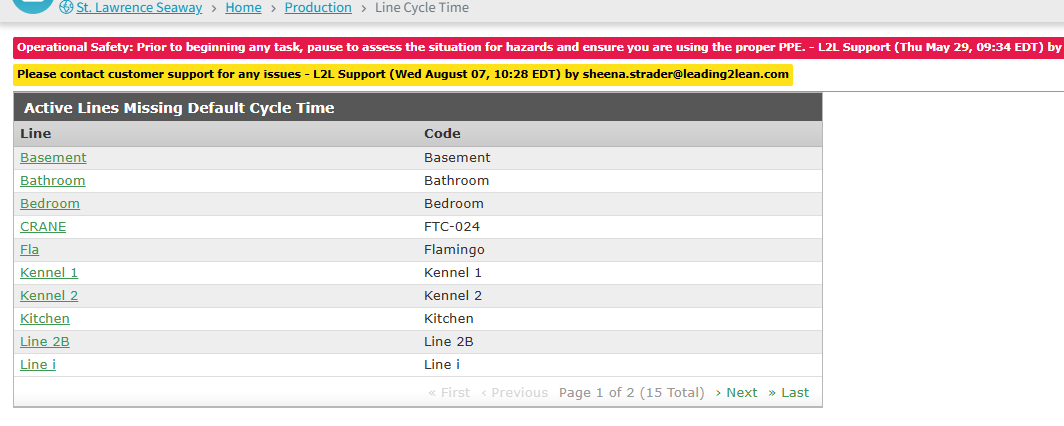
The Line Cycle Time page includes a section that helps identify active Lines that do not have a default cycle time set for all products. The table below lists those Lines. Selecting a Line opens the add cycle time page with that Line preselected.