Purpose
This helps you evaluate whether parts are being consumed at a pace that aligns with how long they remain in inventory. It also helps you see whether stock levels support operations without carrying unnecessary material cost. Inventory turns show how often inventory is used relative to the inventory on hand over time, which helps you evaluate storeroom efficiency.
How to Run
- Open Reports from the left navigation.
- In the Spares Reports list, select Spares Monthly Report.
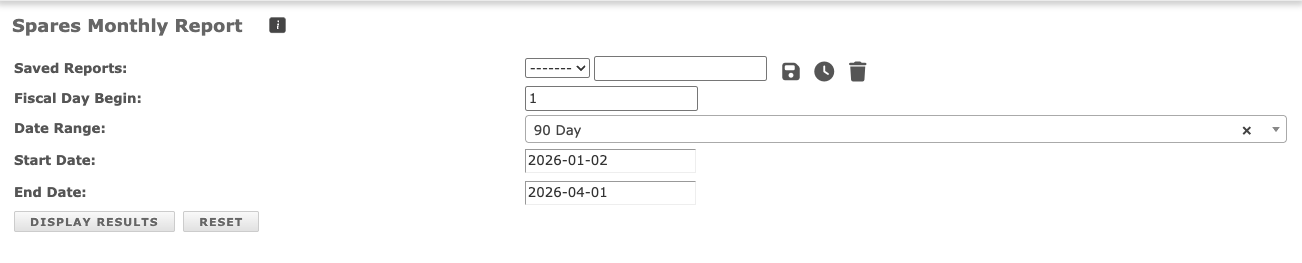
- Update the report form by choosing the reporting period from the Date Range field or preset range options.
- Confirm the Fiscal Day Begin setting because it controls the monthly boundaries used in the report.
- Click Display Results to generate the report table.
If you need transaction-level detail, compare this report with the Spares History Report.
Update the report form
Fiscal Day Begins - This field defines the day each fiscal month starts for financial tracking. When the value is not 1, each monthly row begins on that configured fiscal day and ends on the day before the next fiscal month starts. Most plants that follow a standard calendar month set this to (1).
Viewing the Spares Monthly Report
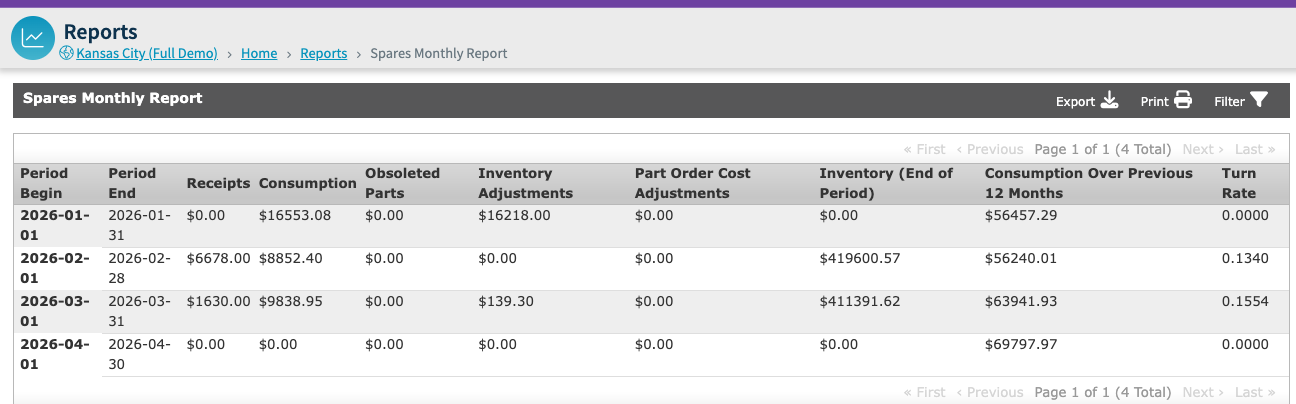
Period End - This is the day before the next fiscal period begins. When Fiscal Day Begin is 1, this is the last calendar day of the month.
Note: You may see different numbers when comparing Spares History and Spares Monthly in the Consumption column. Spares Monthly treats receipt-type inventory adjustments differently than Spares History, which can change the consumption total shown in each report. Users comparing the two reports should expect differences when transaction treatment differs between the reports.