📕Setup - Edit Dispatch Tag Thresholds
Last updated: September 23, 2026
Overview
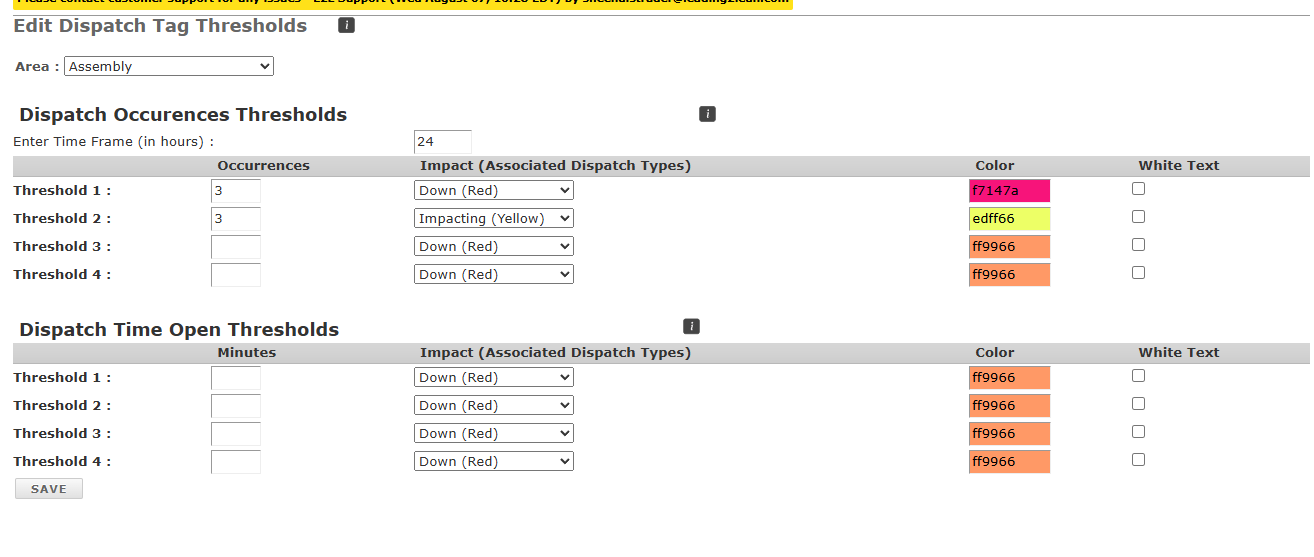
Dispatch Tag Thresholds are used to indicate if a machine has multiple recurring dispatches of a specific impact type over a set time period. This alerts you that a specific machine appears to have a trending issue to address before a potential failure occurs. The downtime field on the dispatch screen can also be set to change background color based on the amount of downtime.
Prerequisites & Preparation
Required Permissions: System Manager or Administrator
Step-by-Step Configuration
Navigate to the Menu: Go to Setup > Edit Dispatch Tag Thresholds.
Select Scope: Select the Area from the dropdown list, or select Set All Areas.
Enter Details:
Threshold Type: Choose Dispatch Occurrence Thresholds or Dispatch Time Open Thresholds.
Time Frame: Enter the time frame, in hours, that you want the system to monitor for recurrence of dispatches.
Occurrences/Minutes: Select the number of occurrences or minutes you want to set.
Define Attributes:
Colors: Select colors to represent each threshold level.
White Text: Check this box to set the font to white on dark backgrounds.
Save & Finalize: Click Save.