📕 Setup - Numeric Grouping
Last updated: September 23, 2026
Overview
Numeric Groupings organize related measurements — such as Weight, Torque Specs, and Percentiles — into a single set. Once configured, they appear in an SPC Widget on the Operator Console and in Checklist Tasks.
Prerequisites & Preparation
Required Permissions: Resource Manager or Administrator
Dependency: PCQI must be enabled for your site. If you do not see Numeric Grouping under System Setup, reach out to L2L to have PCQI enabled for your site.
Step-by-Step Configuration
Navigate to the Menu: Select Setup on the left-hand menu, then, under System Setup, select Numeric Grouping.
Initiate Creation: Select Add New+ in the upper right corner.
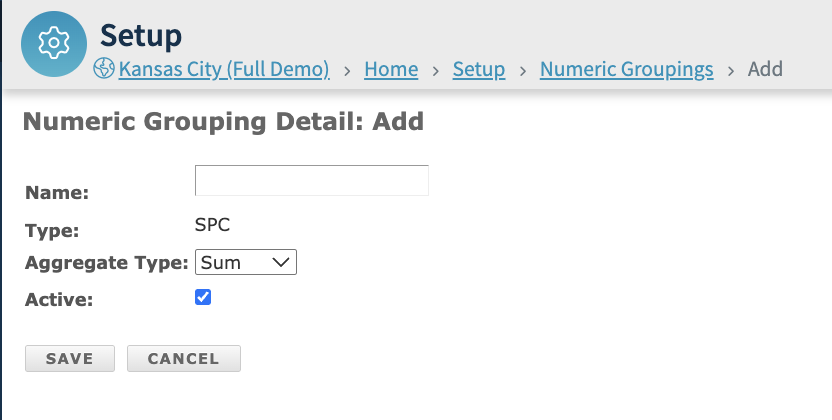
Enter Details:
Name: Enter a name in the Name field.
Define Attributes:
Aggregate Type: Choose from the dropdown — Sum, Avg, Min, Max, or Median.
Status: Uncheck the Active box if the grouping should be inactive.
Save & Finalize: Click Save.


FAQs
Numeric Groupings can be filtered by active/inactive status using the Filter button at the top right of the Attributes page.
Numeric Groupings can be exported using the Export button at the top right of the Attributes page.
