How to Create an API Key
Last updated: September 23, 2026
Overview
API keys allow external systems to integrate with L2L for specific purposes (e.g., opening dispatches, submitting production actuals). Because API keys grant programmatic access to your site's data, their creation is restricted to authorized users and should be scoped and tracked carefully.
Prerequisites & Preparation
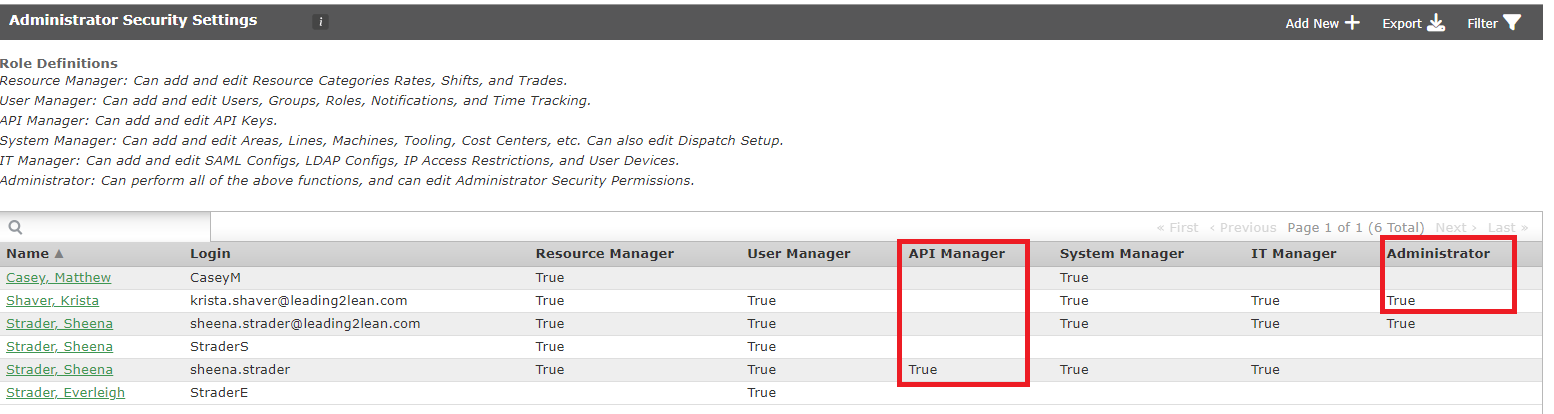
Required Permissions: Administrator, or a user with API Manager designation.
Dependency: You must confirm your permission level before proceeding — check Setup Menu > Administrator Security Settings to see which users are marked Administrator or API Manager (set to True). If you don't have this access, contact one of the users who does.
Note: L2L Support cannot create or grant API keys for customers. For security reasons, API keys must be created by authorized users at your own site with the necessary Administrator permissions.
Step-by-Step Configuration
Determine the API Key's Purpose: Decide what the key will be used for (e.g., opening dispatches, submitting production actuals).
Create a Dedicated User Account: As a best practice, create a new user account with a username unique to the use case — for example,
Dispatch_APIorProduction_API.Assign Administrator Status: Give the new user a unique username and password, then mark that user as an Administrator.
Generate the Key: Click the Generate New API Key button to automatically create the API key.
Define Attributes:
Assign an Owner: Designate a person responsible for knowing what the key is used for, in case of integration issues or changes.
Restrict Endpoints: Optionally designate specific API endpoints for the key to use, narrowing its scope (e.g., limiting it to Production or Spares only, rather than all APIs).
Save & Finalize: Confirm the key is generated and properly scoped.
Best Practices:
unique API key per server + application combination
Include "API" in the username to make it easy to search