Inactivate L2L Accounts: How to Find Them and What Happens on In-Activation
Last updated: June 19, 2026
What Happens on In-Activation of an Account
Employees who have Admin level access in L2L, as well as L2L Support, can take care of manual account edits. The individual record changes are easy for L2L Admins whereas any mass updates should be directed to L2L Support personnel.
Many L2L customers incorporate inactivating associate L2L accounts as part of their exit process. I.e., part of the outgoing HR process.
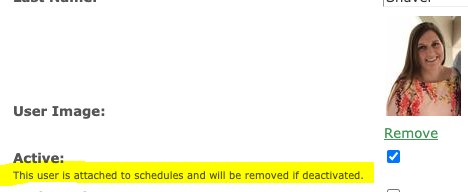
As a reminder, when you inactivate a Resource in L2L, they are removed from all Scheduled events, such as PMs. Please be mindful of this so Scheduled Events are not left unstaffed.
Any checked-out documents are automatically checked back in.
How to Find Inactive Accounts
The User Setup page automatically defaults to ONLY ACTIVE accounts. Check your filtering options, try Inactive or ALL.
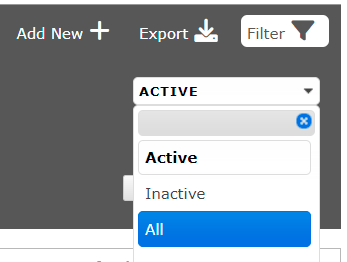
Hit APPLY!

Pro Tip: keep this in mind whenever you are searching. You may be inadvertently narrowing your search with the filtering options you've selected.