Action Codes
Last updated: September 25, 2026
Overview
Action Codes are used during dispatch events to capture the action (verb) performed. They allow you to drill deeper into dispatch reports to see the specific actions taken to complete and close dispatch events. Action Codes are a predefined list generated by your site champion — if you don't see an appropriate code or would like more added, your site champion/administrator can easily add or remove them.
Examples:
"I replaced the belt on the drive." → Action is Replaced
"The track needed to be re-aligned." → Action is Re-aligned
Quick Tip: You can find actions faster by typing into the box — it will match actions as you type.
Note: If using the Dispatch Portal, Execution AI will suggest fixes based on the Machine, Dispatch Type, and recent historical data. Click Add Action to choose a fix.
Prerequisites & Preparation
Required Permissions: System Manager or Administrator
Step-by-Step Configuration
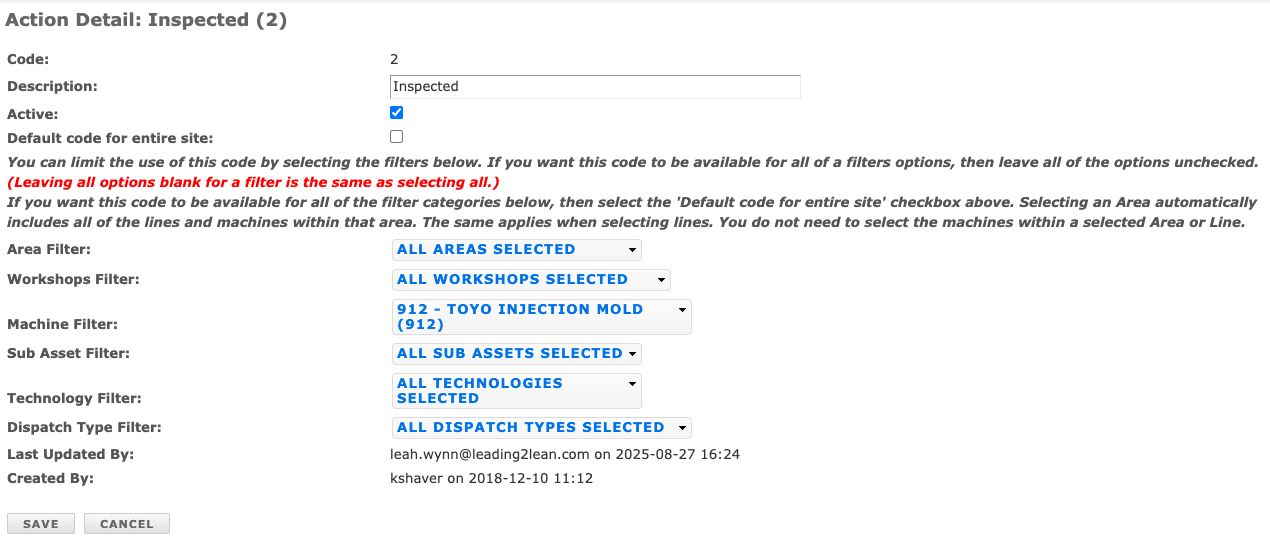
Navigate to the Menu: Go to Setup > Action Codes.
Initiate Creation: Click Add New in the upper right corner of the Action Codes bar.
Enter Details:
Description: Enter the Action Code description.
Define Attributes:
Default: Check this option if the code should be available for all events across the entire site. Leave unchecked if the code applies only to specific event types and/or machine(s), and select the applicable criteria below (Area, Line, Machine, Dispatch Type, Sub-Asset, etc.).
Save & Finalize: Click Save.