📕Setup - Critical Machines / Significant Downtime
Last updated: September 23, 2026
Overview
In most operations, "Critical" or priority machines or processes are identified and can be tracked with varying priority levels. If a constraint process or machine is identified, the Critical/Significant setup can be a great tool to bring heightened awareness to these processes or machines.
Prerequisites & Preparation
Required Permissions: System Manager or Administrator
Step-by-Step Configuration
Navigate to the Menu: Go to Setup > Edit Critical/Significant Downtime.
Select Scope: Select applicable machines.
Note: You can drill down by Area, Line, Technology, etc. to shorten the machine list to choose from.
Enter Details: A list of all machines based on the selected criteria will appear at the bottom of the screen with current Critical & Significant Downtime settings.
Define Attributes:
Critical Status: Click Set Critical to mark machines in the list as Critical, or Clear Critical to remove Critical status.
Significant Downtime: Enter the significant downtime setting, in minutes, and click Set Sig Downtime to apply the limit to machines in the list.
Save & Finalize: Click Apply.
Note: You must refresh the machine list before selecting the option you want to perform (e.g., Set Critical) by using the Apply button.
How these tools work:
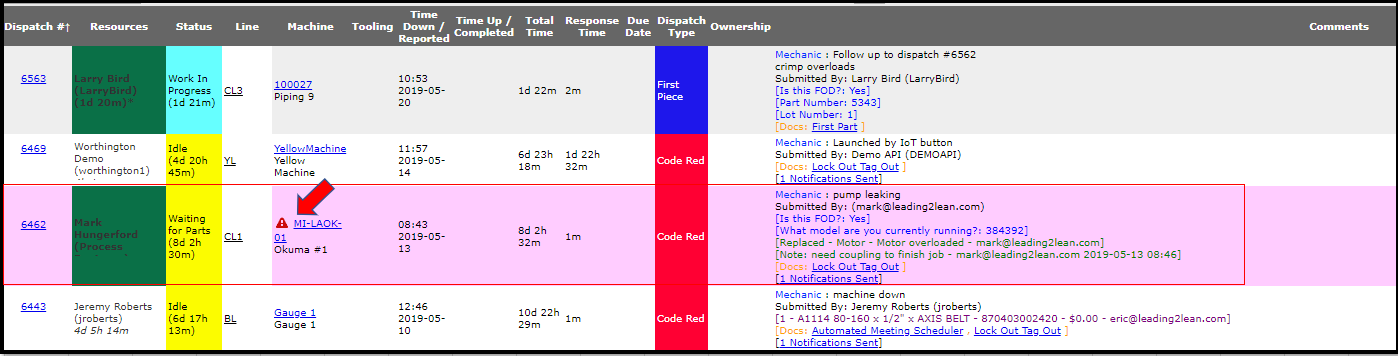
Critical tagging elevates priority: Critical Areas, Lines, or Machines can be tagged to raise their priority, which triggers a visual signal on the main Dispatch Screen.
Visual indicator: A red triangle with an exclamation point appears next to any machine marked "critical."
Optional highlight: If the Dispatch Type setting "Highlight Critical" is enabled, critical machines are also highlighted in pink across the Dispatch Screens for easy visibility.
Significant Downtime tracking: Significant Downtime settings track and report on events that exceed a defined downtime threshold — feeding into the Significant Occurrence (Breakdown) Pareto report and triggering the launch of a new Significant Event in the problem-solving module whenever a dispatch crosses that threshold.
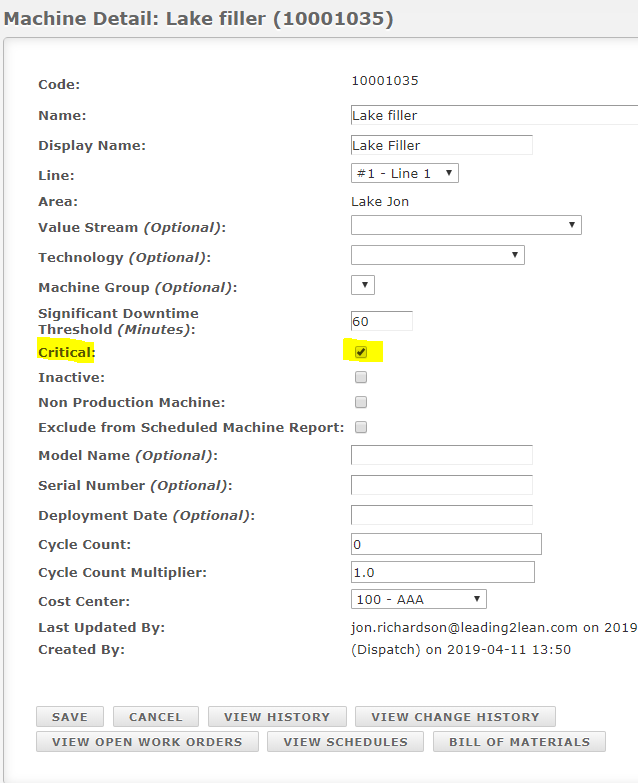
Quick toggle: A machine's critical status can also be enabled or disabled directly during setup, by checking (or unchecking) the "Critical" checkbox in Setup Machine Details.