L2L - Swipeguide Integration Use Cases
Last updated: June 19, 2026
Why?
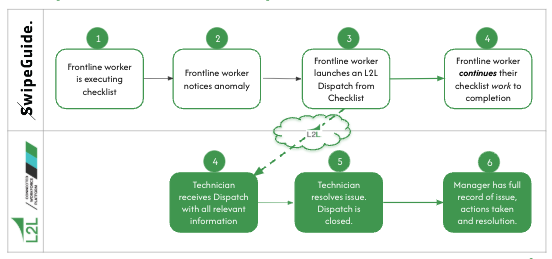
Faster Response: Faced with an unsolvable challenge, a frontline worker can now quickly create a Dispatch directly from the SwipeGuide checklist. Capturing a comprehensive overview of an issue, a Dispatch enables the technician or manager to drive faster resolution and the frontline worker can continue working through their checklist.
Dynamic Workflows with Follow-Ups: More than a simple alert, a Dispatch gives team members the critical context they need to solve an issue; ensures automatic escalation if an issue remains unaddressed, and ensures no critical issue falls through the cracks.
Continuous Improvement: By capturing every issue and corrective action taken, Dispatch provides a complete digital log that enables managers to examine patterns, identify recurring issues, and solve root-cause issues, ensuring continuous improvement.
What's available today!
- Access Guides from within L2L (Set up instructions here):
- Via a Dispatch: eg. there's a Code Red Dispatch for a mechanical failure of a robot → immediate reference on how to perform the procedure.
- From the Operator Portal: eg. Operator but doesn’t recall how to perform a task → Click on the “Documents” tab → Review the step-by-step procedure and successfully execute the task.
- From a L2L Checklist: Operator can access Standard Work from a Checklist in the Operator Portal.
- From the Documents folder: Operator can access Standard Work from the Documents folder.
- Vice versa, SwipeGuide users can now launch a dispatch for technicians in L2L by instantly alerting of issue from a checklist anomaly. Find out how here!
- Launch a L2L Checklist from a Guide - Set up instructions can be found here.
Want a Demo of Swipeguide - book one here!