How to delete or wipe spares in L2L
Last updated: November 19, 2026
There are two ways to remove spares in L2L, depending on how many items you need to remove and whether you want a full site wipe.
Deleting individual spares from a dispatch
To remove a spare that has been requested on a dispatch:
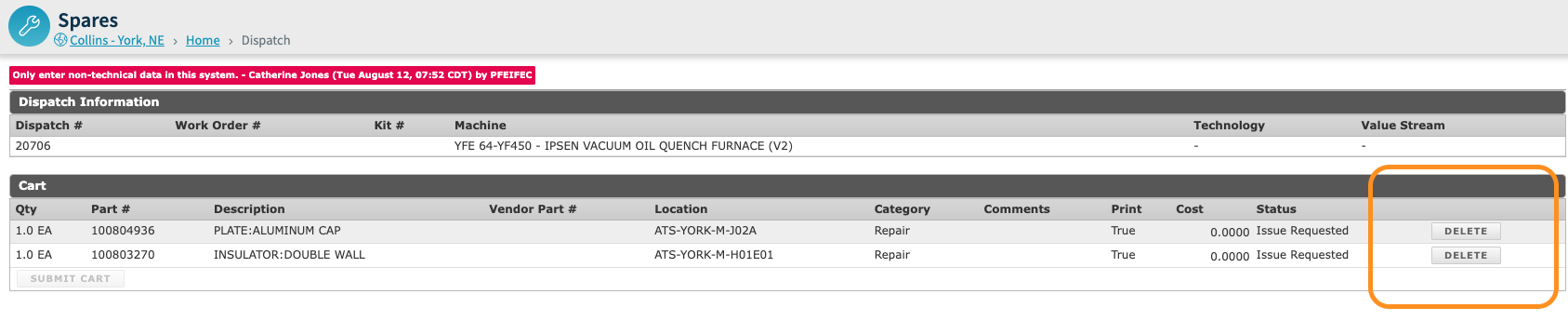
Open the dispatch and click the Request Spares link.
You will see each spare request listed with a Delete option next to it.
Click Delete next to the spare you want to remove.
For more information, see the Spares: Parts Module Overview article.
Requesting a full spares wipe for a site
If you need to remove all spares from a site (for example, to rebuild your inventory with a new naming convention or re-import updated data), L2L's engineering team can perform a full spares wipe on your behalf.
Important: A full spares wipe is an all-or-nothing operation. It will permanently remove all spare parts data for the selected site, including any previously issued spares. This action cannot be undone. Please confirm you are ready before requesting the wipe.
What is included in a full spares wipe:
All spare parts records for the site
Spares warehouse data (if requested)
What is NOT included:
Dispatches and assets (these are unaffected)
Consumption categories (these cannot currently be wiped, but can be inactivated manually)
To request a full spares wipe, contact L2L Support and provide:
Your site name and site ID
Confirmation that you want all spares removed
Whether you also want spares warehouses wiped
The support team will coordinate with the engineering team and notify you when the wipe is complete.
Marking spares as inactive instead of deleting
If you only need to hide certain spares from your active inventory without permanently removing them, you can mark them as inactive. Inactive spares are hidden from active inventory lists but are retained for historical and reporting purposes. This is useful when spares were uploaded by mistake but you still want to preserve data integrity.