Document Linking & Auto-Attach Logic
Last updated: July 14, 2026
Manual Resource Linking
You can tie documents directly to physical resources so your team can easily pull them up via the local dispatch library.
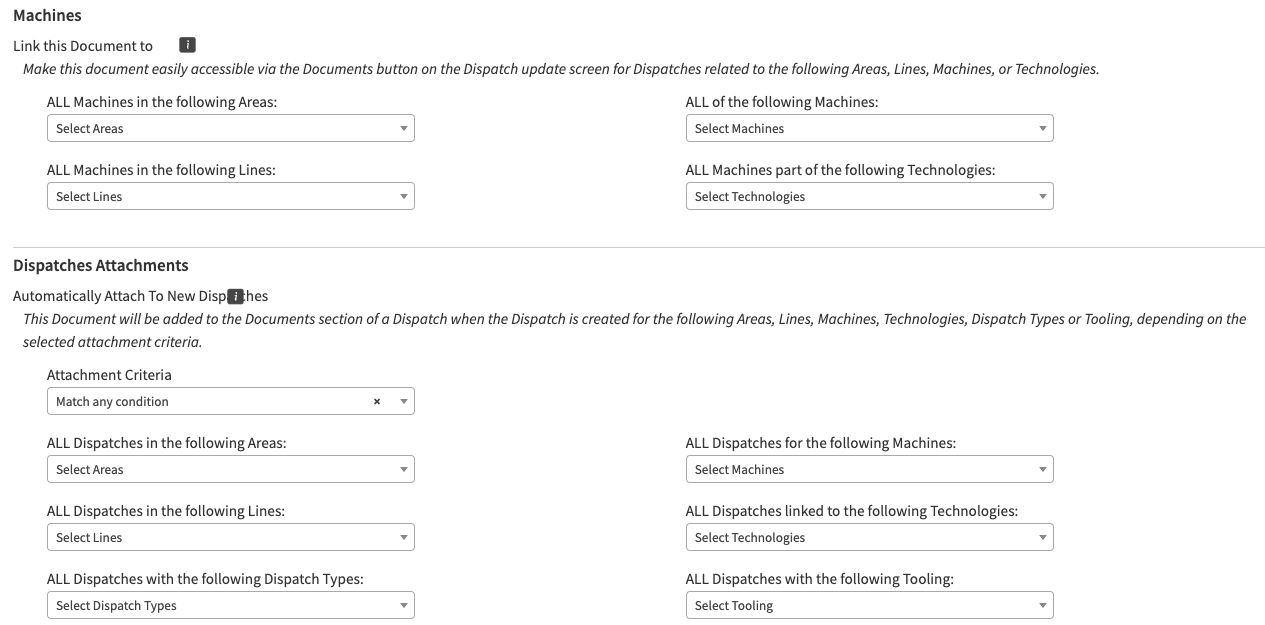
Link this Document to: Allows you to associate the file to specific Areas, Lines, Machines, or Technologies.
Behavior Note: Selecting criteria broadens the scope dynamically. For example, selecting Line A and the technology Weld will apply the document to every machine on Line A, as well as any machine sitewide tagged with Weld technology.
Pro-Tip: If a document is primarily used for automated Preventive Maintenance (PMs) or Audits, leave these fields blank. Let your scheduler pull the document dynamically instead.
Automated Dispatch Attachment
You can configure documents to automatically attach themselves to brand-new dispatches the moment they are created based on conditional logic.
Logic Type | How It Works | Best Used For |
Match Any Condition | Attaches the document if at least one chosen criterion is satisfied. | Standard procedures that apply broadly (e.g., attach a safety document to any Code Red event OR any machine on Line A). |
Match ALL Conditions | Narrowly isolates dispatches; every single restriction must be simultaneously met. | Specific troubleshooting guides (e.g., attach only if it is a Code Red event AND it occurs specifically on Line A). |
Note: Dropdown selection lists turn gray once an item is selected. To remove a filter, click it a second time. To view a clean list of all active filters, save your progress and view the static version of the Document Detail screen.