How to Request a Bulk Dispatch Closure
Last updated: November 4, 2026
If you need to close a large number of dispatches at once, L2L Support can process a mass update for your site.
To ensure your request is processed quickly and accurately, please submit a ticket to L2L Support with an attached file containing only the specific dispatches you need closed.
File Requirements
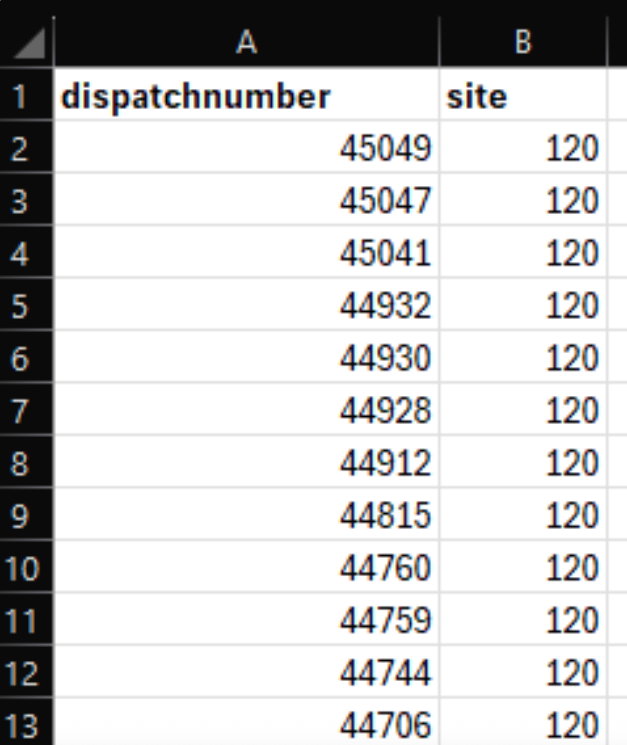
Your attachment (Excel or CSV format) must include one of the following ID combinations:
Option 1: Dispatch Number AND Site ID (in two separate columns, and only one dispatch number per row) * The site ID number can be identified quickly by hovering over the site name in L2L.
Option 2: Dispatch ID (the unique system ID)
Note: Please ensure your spreadsheet is filtered correctly and contains only the list of dispatches intended for closure.
How to Gather Your Dispatch List
Depending on the reason for the closure, you can easily generate this list by exporting data directly from your system:
Go to your Dispatch History Report (or alternative preferred export tool).
Apply filters to isolate the dispatches you want to close.
Export the results to Excel or CSV.
Remove any extra columns so only the required identifiers remain.
Review the file to confirm it doesn't include dispatches that shouldn't be closed.
Attach the file to your support request.
If you find yourself regularly looking to mass-close dispatches, it might also be worth reviewing the current setup to address any potential misconfigurations.