FAQs
Last updated: September 24, 2026
Do you ever feel like you have a simple question that may require a quick answer? Here is a list of some of our Frequently Asked Questions.
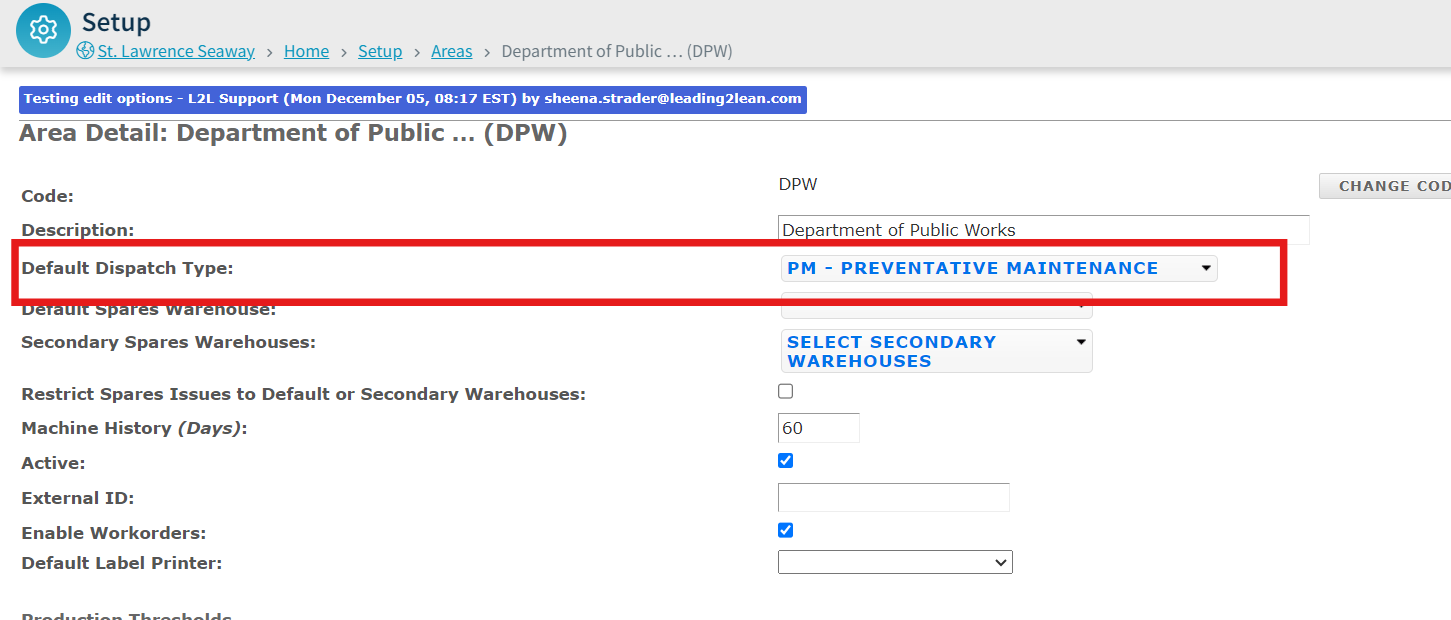
Q: Why does my dispatch default to a specific dispatch type when selecting a machine?
A: Within L2L, we have a site hierarchy: Area → Line → Machine. Every Machine must be assigned to a Line, and every Line is assigned to a specific Area. Within your Area Settings, there is a setting for Default Dispatch Type. Whenever you select a machine or line, it automatically defaults to the Area Dispatch Type assigned to that Line or Machine's area.
Q: Why can't I find a user's name in the dropdown list when scheduling a report?
A: If a user is active in the system but missing from the recipient list for scheduled reports, first check if the user has a valid email address listed in their profile. If their email is correct and the issue persists, refer to our troubleshooting article on Save and Scheduled Reports. Check out our Save and Scheduled Reports article under Trouble-Shooting for more tips.
Q: Why does my Dispatch Menu only have 3 sub-menus, or how do I revert from Dispatch Portal back to Classic View?
A: This occurs when the Dispatch Portal is set as your default view. You can revert this back to Classic View under your User Settings. To access different dispatch views: 1) Open the left menu and click Dispatch, 2) choose Dispatch Portal for the portal view, or 3) click Classic then ALL for the classic list view. The availability of these options depends on your Dispatch View setting in User Settings.

Q: Why is a Resource not appearing as an option to be assigned to a Dispatch?
A: This typically happens when the Resource has set their status to Unavailable on their home screen. Check out this article for more.

Q: Why does the Area automatically default when submitting a dispatch with a machine and dispatch type selected?
A: A machine can only be assigned to one line, and a line can only belong to one area. Because of this structure, selecting a machine automatically locks in its assigned Line and Area. To change the default Area, the machine itself must be reassigned to a line in that specific Area.
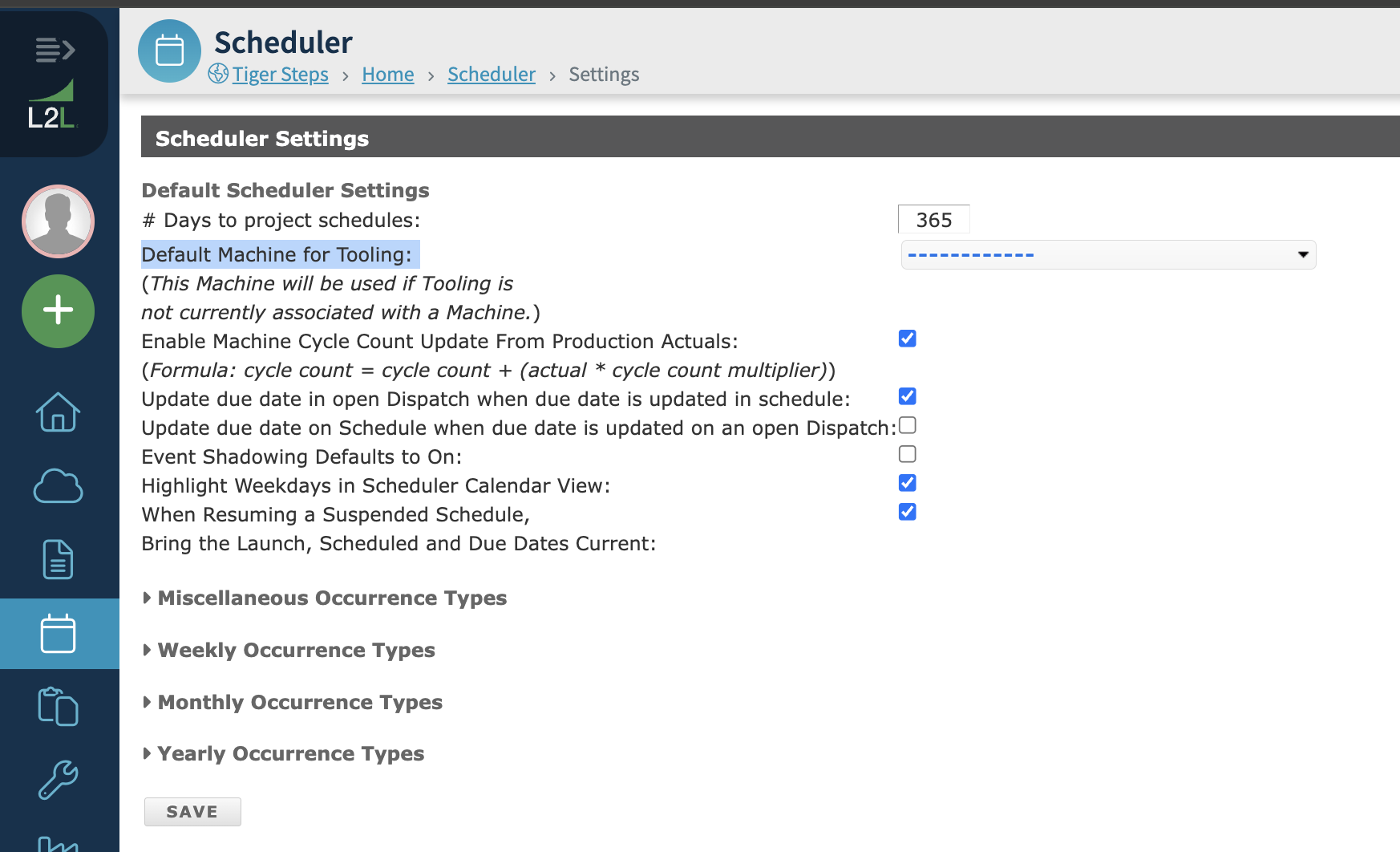
Q: Can I create a dispatch for tooling that isn't currently assigned to a machine?
A: Every dispatch requires a machine. For offline or unassigned tooling, create a Digital (Virtual) Machine. In your Scheduler Settings, you can assign this virtual machine as the default for tooling, which allows auto-launching for items not attached to a physical machine.
Q: How many API calls are allowed for the pitchdetails/record_details/ method?
A: A safe limit is 1 post per minute, per line. Running single threads asynchronously per line is fine as long as posts do not exceed once per minute per line. If you need to send a large backlog of pitch details in rapid succession, use the pitchdetails/record_details_batch method instead to update multiple lines in a single request.
Q: Why am I getting locked out of Admin settings even though I have Admin Security Permissions?
A: Roles like Resource Manager, User Manager, API Manager, System Manager, or IT Manager still require the user to be a full Administrator in addition to having specific Admin Security Setting permissions. Here is an article on our Comprehensive Guide to Access in L2L

Q: How do I include direct links to dispatches in email notifications?
A: Dispatch links are currently only included in notifications for Assigned Resources and Dispatched Resources. When configuring your Notification Formats under Downtime, Assigned Resources, or Completed, ensure you check the box to include the link option.
Q: Why does the Dispatch History Report show incorrect downtime minutes?
A: All Dispatch Reports capture the total machine downtime, which includes Non-Production Minutes. If you need reports that exclude non-production time, use Production Reports such as the Daily/Weekly Production Summary Report or the Lost Production Time Report.
Q: Why isn't a Work Order launching into a dispatch?
A: Work orders will not launch if they are in New, Reviewing, On Hold, or Ready to Schedule status. Work orders must be Approved and updated to Scheduled status to launch properly.
Q: Why do I get the error "Machine Already Has Open Critical Dispatch" when creating a dispatch?
A: This error occurs if a dispatch type has the setting "Allow Only One Dispatch per Machine Open Simultaneously" enabled, and an open dispatch of that type already exists for that machine.
To fix this:
Check open dispatches on the machine.
Review the dispatch type settings and uncheck "Allow Only One Dispatch per Machine Open Simultaneously" if you want to allow multiple open dispatches.
Q: Can I edit or update a username?
A: No. Usernames cannot be changed once created because historical records and system IDs are permanently tied to them. To change a user's name, inactivate the existing account and create a new one.
Q: Why does the system time out or redirect when trying to load a pitch schedule?
A: You must have the Production Planner Permission enabled under Production Settings to load pitch schedules.
Q: How do I cancel a scheduled report set up by someone else?
A: You must have permissions to manage scheduled reports, which allows you to locate and delete the report under Account Settings > Scheduled Reports. If you lack admin permissions, you will need to contact the report's creator to delete it or remove you from the recipient list.
Q: Why is my Dispatch History Report returning "No Data Showing"?
A: This can happen for two reasons:
Using the Resource filter for closed dispatches: The Resource filter only searches resources that are currently dispatched, so it will return no results for closed dispatches since they no longer have active resource assignments. Instead, use filters like Date Range, Area, Submitted By, Dispatch Type, and the Closed Dispatches checkbox to locate closed dispatches.
Conflicting filter checkboxes: Selecting multiple filter checkboxes at once can conflict and clear out results. Only check one option at a time when running the report. To view all data, clear all checkboxes.
Q: Why isn't my pitch schedule template showing in the Op Portal?
A: Check for the following issues:
Overlapping Shift Times: Ensure shift times do not overlap (e.g., use
00:00 - 23:59instead of00:00 - 00:00).Template Alignment: Ensure your pitch template times match your defined shift times without overlaps.
Q: How do I resolve the Scheduler Error: "Name already Exists"?
A: This occurs when a schedule shares a name with a pre-existing schedule (including inactive ones).
Fix:
Search for the schedule name using the ALL filter.
Edit the duplicate schedule's name (e.g., append
(inactive)).Save your changes and try again.
Q: Can we recover data if someone clicks "Close All Spares" in the Spares Queue?
A: No. Closed spares data cannot be automatically restored. As a workaround, run a Spares History Report filtered to ALL for the relevant date range to review which spares were requested and closed during that time.
Q: Why isn't QuickDispatch allowing me to submit?
A: QuickDispatch requires a Default Trade to be selected for your site under site settings.
Q: How do I fix the "User Already Exists" error in SwipeGuide?
A: This happens if the user exists in a different team that you don't have visibility into. You will need to be added to that team or have an admin reassign the user.
Q: Why are dispatches missing from my search results in Classic or Dispatch Portal?
A: Search results are capped at 30 days by default to improve system performance. If you need a wider search window (30, 60, 90 days, or No Limit), contact L2L Support to adjust your site setting.