3.19.26 Dispatch Search Performance Improvements

🚀 Optimized Dispatch Search Performance
We’ve optimized how the search bar handles data to ensure the Dispatch Portal remains fast and responsive, even for sites with massive amounts of historical data.
To keep results snappy, text-based searches in the Dispatch Portal now default to the last 30 days of records.
If your search results are being limited by this timeframe, a small information (ⓘ) icon will appear inside the search box. Hovering over this icon will explain the limit and suggest using filters or the Dispatch History for older records.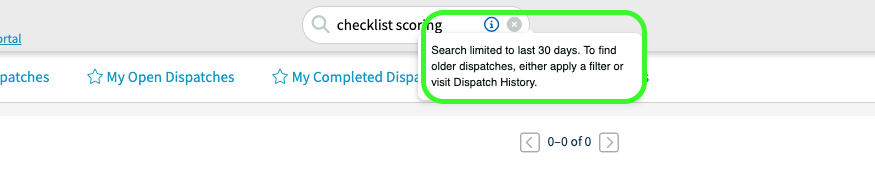
The 30-day limit is automatically lifted whenever you have an active filter (such as Area, Trade, or Status) applied. Since filters already narrow the dataset, the system allows for a deeper search without sacrificing performance.
Reliable Direct Links to Dispatches
Navigating to a specific record is now more precise. When using "Open in Portal" links or redirecting from the classic view:
The system now targets the specific Dispatch Number directly rather than triggering a general search.
This ensures the dispatch is found regardless of date ranges or currently active filters.
Upon loading, the matching row will automatically expand, so you can get straight to work.
For sites with specific workflows requiring a broader default search, L2L Admins can now adjust the search window upon request within the Site Properties.
Options: 30, 60, 90 days, or No Limit.
Performance Tip: While "No Limit" is available, keeping the window shorter (e.g., 30 days) provides the fastest page load times for your users.
-

Is this specifically for the technician portal or would there be effects on the legacy dispatch screen as well? We seem to be having weird things happening. Hoping for clarity before launching a ticket.
0 -

Hello Steve,
This feature applies to the classic dispatch screen as well. You will see the 'i' icon in the search bar which indicates this.
1
Please sign in to leave a comment.
Comments
2 comments