11.19.25 Checklist Auto-Save!

Document Center
- Checklist Auto-Save is here! This update ensures your progress is always captured — even if you navigate away or lose connection.
- Corrective Actions/Notes has been renamed to Comments/Notes.
- We've also added more specific error messages when checklists can't be closed.
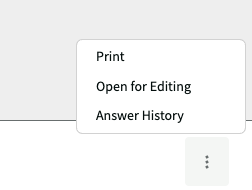
- Closed Checklists - The Open Checklist for Editing button is now in the three dots on the bottom right, along with the option to Print & the Answer History.
Reports
Checklist Answers has been renamed to Checklist History
-
Official comment
Ayuko Yamamoto You should only be prompted at the beginning of the checklist and if you use Finish Editing and then answer a task.
-

Hello Krista,
Thank you for the information.
When the "Require user and password to save Checklist" setting is enabled, username and password input required for every single question. This issue might be caused by "Checklist Auto-Save", I'm guessing. Is this working as intended?
Thanks.1 -

Ayuko brings up a good point -- I'm curious to know this too because we just started using that feature. Is it going to require it after every question?
0 -

This has been creating issues with the "Require user and password to save Checklist" function.
0 -
From what I'm seeing with our operators completing the checklists, they're being immediately prompted to enter their username/password as soon as they open the checklist, and then it allows them to complete the checklist.
0 -
Craig Umberger , that is the expected behavior. It should prompt at the beginning of the checklist. If you run into any other issues or concerns, please submit a ticket.
0 -

With autosave enabled, the system will save changes right away whenever a checklist is updated.
Please note that if the checklist is configured to require users to enter a username and password to save progress, the previous behavior has shifted to open the prompt for credentials as soon as the checklist form opens, since the system is looking to capture any immediate changes.For a new checklist that’s opened, completed, and closed by the same person in the same session, the user should only have to enter their username and password once in the beginning. After this, they can make updates and mark the checklist closed without needing to enter their credentials again, unless they navigate away from the checklist or click the "Finish Editing" option, which is designed for checklists being filled out by multiple users, as this will then prompt another user to enter their credentials to make their own changes.
If a user ignores, closes, or cancels out the credentials prompt instead of entering their information, each time an update is made, the system will continue to prompt them to input the required credentials, since this is needed to save the updates.
If more than one operator is working on a single checklist, the “Finish Editing” button allows a user to finish their part and save. After this, the system will then ask for the other team member's credentials to continue editing the checklist, ensuring each person’s contributions are digitally signed and tracked.
0 -

I see above the comment "With autosave enabled...". Does that mean that the feature can be disabled? If so, how? We have run into an issue with technicians selecting an incorrect value, then going back to correct the response, but a follow-up dispatch has already been created prompting others to take action that is not required. At this point, we're not sure if this is a "real" problem, but wanted to know what the options were if it persists after advising the teams.
0 -
Hi Doug,
I've escalated this concern to our product team. They are discussing the best path forward and will be implementing a solution (likely not until next week). I'll create a support ticket so you can follow up on it.
Thank you,
Krista
0 -
Just a thought: Rather than enable/disable (because we like the feature), would it be possible to have an option to not trigger a follow-up until the checklist is closed?
0 -

We would like to have the option to enable/disable the auto-save feature.
0 -
Amy Marie Holland - Please follow up in the ongoing Zendesk ticket related to auto-save, I'd like to hear more. Thanks!
0
Please sign in to leave a comment.
Comments
12 comments